
Human-Like AI Agents Inside Real Apps: A Full Teardown Using Tinder
Most "browser bots" are about as subtle as a brick through a window. They spin up a headless Chromium, blast through the DOM, and get flagged before they've finished saying hello. We wanted the opposite: an agent that behaves like an actual person inside a real app — looking at the screen, reasoning out loud, and clicking like a slightly-too-confident human.
The polygon we chose was Tinder. Not for romance — for the anti-fraud. Tinder needs voice, context, and visuals all at once, and it actively hunts automation. If your agent survives there, it'll survive almost anywhere. Here's the full teardown.
1. What "human-like" actually means
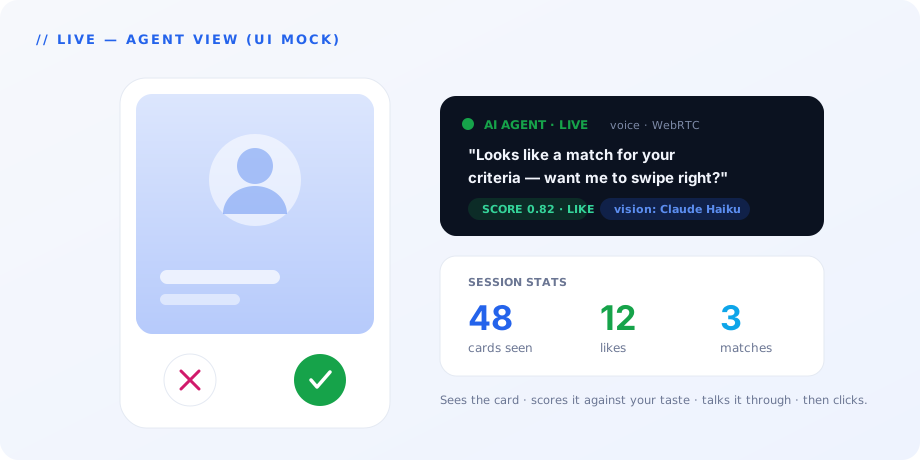
A classic scraper reads data. Our agent uses an app — it sees a card, judges it against your taste, chats about it by voice, and swipes. The difference is night and day: a scraper consumes a page, an agent experiences one. The goal here was a personal AI wingman that looks at profiles, scores them by your criteria, talks it through with you, and taps the buttons.
Why Tinder specifically? Because it's a brutal test bed. Hard anti-fraud, mandatory visual understanding, a need for natural back-and-forth — exactly the mix that breaks lazy automation. If it works here, the architecture is real.
2. How not to get caught (anti-ban)
First lesson, learned the hard way: headless browsers get burned in seconds. Tinder takes one look at a headless Chromium and traps it in an infinite captcha loop. Game over.
Second lesson: cookie import doesn't save you. Tinder leans on localStorage plus a device fingerprint, so copying cookies into a fresh browser fools nobody.
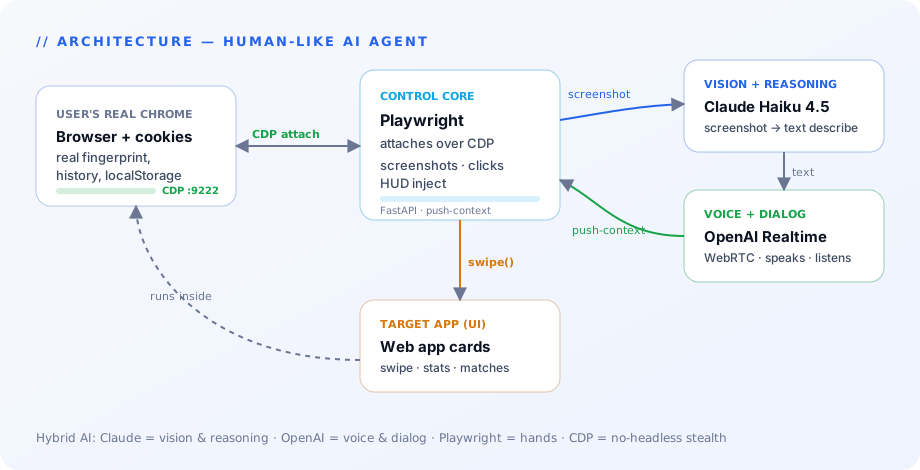
The fix is almost philosophical. Instead of launching our browser, we attach to the user's browser. Using Chrome DevTools Protocol (CDP), Playwright drives the human's own Chrome — complete with its real history, cookies, and fingerprint. The key insight: a human-like agent should never open a new browser. It should ride along inside a human one.
3. Playwright MCP — how the AI grows hands
This is the most interesting brick in the wall, so we'll go deep below. Short version: Playwright gives the agent hands, and MCP makes those hands a standard, reusable tool.
4. Hybrid AI: different models for different senses
Here's a fun constraint. OpenAI's Realtime API gives you gorgeous, low-latency voice over WebRTC — but you can't push images through that channel (the data channel has a size limit). So the model that talks beautifully is effectively blind.
The solution is to let each model do what it's best at. Claude Haiku 4.5 looks at the screenshot and writes a crisp text description. That text goes to OpenAI Realtime, which turns it into natural speech. Claude handles vision and reasoning; OpenAI handles voice and dialogue. Two specialists beat one generalist trying to do everything.
5. Push-context architecture
The naive design is a state machine bristling with tools. We went the other way. Instead of an FSM, the server pushes context directly into the Realtime session via conversation.item.create / input_text. The model simply knows the new card is on screen before the user has even opened their mouth.
The payoff: one tool (swipe) instead of three, no finite-state-machine bugs, and latency hidden behind natural conversation. The UX stays smooth because the agent is always one beat ahead.
6. Prompt engineering with personality
An agent is not obliged to sound like a focus-grouped customer-service bot. A little personality goes a long way — and, crucially, it makes the conversation feel like a conversation. We loaded the user's own preferences (bio_criteria) into every prompt so judgments matched their taste, not the model's. We also wired up trigger phrases for ready-made flows — say the magic words and the agent reels off your likes-and-matches stats. Character isn't decoration; it's UX.
7. Five things this project teaches (one line each)
- Realtime API ≠ multimodal API — bolt vision on the side.
- Hybrid AI is the norm, not a hack — let specialists specialise.
- CDP-attach beats headless against any serious anti-fraud system.
- Fill the silences — six seconds of dead air kills the experience.
- A system prompt with character is worth +100 to dialogue quality.
Deep dive: Playwright MCP
This is the part worth slowing down for.
What MCP is, in one breath
The Model Context Protocol is an Anthropic standard (November 2024) that describes how an LLM reaches external tools. Before MCP, every client — Claude Code, Cursor, your own app — shipped its own integrations. With MCP there's a single protocol: a server exposes tools / resources / prompts, and any client connects and uses them.
What Playwright MCP is
Playwright MCP is Microsoft's MCP server that wraps Playwright in the standard interface. The result: any LLM can drive a browser through standard tool calls — browser_navigate, browser_click, browser_snapshot, browser_evaluate, and friends.
Why it matters here
We use Playwright in two modes, and that's the whole trick:
- A. Direct Playwright in Python (production logic) — clicks, screenshots, HUD injection. Precise control, error handling, async. This is the agent's hands in real time.
- B. Playwright MCP inside Claude Code (dev & debug) — during development we can literally say "open the app, take a screenshot," and the model does it through MCP. The AI writes code while looking at the live result: run a script, snapshot, spot the breakage, fix it, repeat.
Both modes attach to the same Chrome over the same CDP port (9222), so they never collide with production Playwright. One line of config does the heavy lifting:
{
  "mcpServers": {
    "playwright": {
      "command": "npx",
      "args": ["@playwright/mcp@latest", "--cdp-endpoint", "http://localhost:9222"]
    }
  }
}
That single --cdp-endpoint flag flips the MCP server from "opens its own Chromium" to "attaches to the user's Chrome." For anti-ban, that's the whole ballgame.
Why this is the keystone, not a footnote
Playwright MCP turns the AI into a self-sufficient developer: see the error → fix the code → verify via snapshot → iterate. Tests become a conversation ("check that the badge appeared"), and the exact same setup automates any web app — point it at a CRM, a Notion workspace, or a Stripe dashboard tomorrow and you've got a voice agent for those too. The same standard protocol carries the agent across development, testing, and production. That's human imitation at a new level: the AI doesn't just script actions — it holds the browser as a tool, the same way, at every stage.
The stack, in one line
Claude Sonnet/Haiku 4.5 (vision) · OpenAI gpt-realtime (voice, WebRTC) · Playwright + Playwright MCP (Chrome over CDP) · FastAPI + SQLite WAL (backend) · Streamlit (dashboard) · MCP (the universal bridge between AI and external tools).
None of this is Tinder-specific. Swap the target app and the same architecture — stealthy browser control, hybrid vision-plus-voice, push-context, one clean tool — turns into a human-like agent for whatever workflow you care about. If you have an app you'd quietly love an agent to operate like a person, that's exactly the kind of thing we build.